Screen: ShopSite > Products > Edit Product Info

Ordering Options

The ordering options feature allows customers to specify options for a product, such as color and size. The options choices can appear with the product listing in your store and on the order form, or just on the order form. The customer's choices will appear with the report of the sale in the e-mail notification and in the Orders section of ShopSite.

Note:

You cannot use this feature if the price of the item changes due to options that the customer specifies. You must enter differently-priced items into the database separately. For example, if the size XL sweatshirt is $2.00 more, it must be a separate product, or else the order total will not be correct.

  1. Set the ordering options text, which will appear under the product listing. You can give the customer instructions regarding their choice, or simply ask them to make the choice. This text is optional, because if you use the pull-down menu feature, the menu may display simply "large, medium, small," which is self explanatory.
  2.  

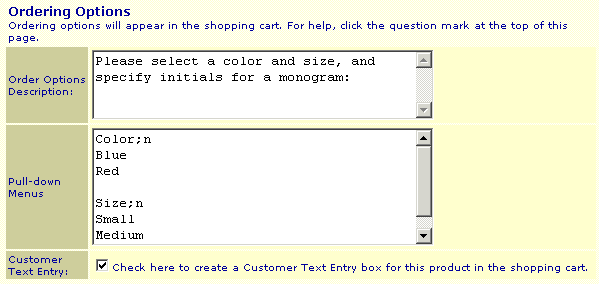
  3. Create pull-down menus of the options that customers can select from. List each menu item on a separate line (press Enter after each item) and skip a line (press Enter twice) between menus. You can force customers to make a selection by adding ;n (semicolon and the letter n) after the first item in a menu. The ;n will not be visible to customers, but ShopSite will tell them that they need to make a selection if they try to proceed without selecting a valid option.

    The example below shows how to make two menus, one for color, and one for size, and both force customers to make selections:
     

  4.  

  5. The example also has the Create Text Entry Field box checked, which causes a text-entry field to appear below your instructions and the pull-down menus. This provides a place for the customer to enter any information you might need to ask for, such as a name or initials to personalize an item.

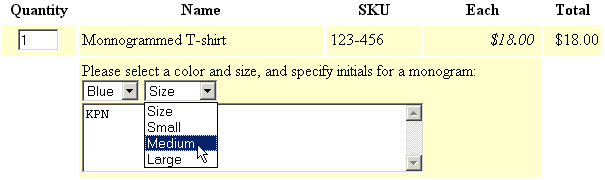
    Here is an example of how ordering options are displayed on the shopping cart screen:


ShopSite Help and Resource Center
Give Feedback

© 2007, ShopSite, Inc.
ShopSite Shopping Cart Software