Downloading Orders

Once you configure ShopSite Order Transfer, you can download orders from your ShopSite store to QuickBooks in as little as three mouse clicks.


Note:

If you want ordered products to automatically be associated with a specific QuickBooks account, you will need to Export the account types into ShopSite and assign the product to the desired QuickBooks account type.

  1. Start ShopSite Order Transfer by double-clicking the ShopSite Order Transfer icon on the desktop or selecting it from the Start > Programs > ShopSite Order Transfer menu.
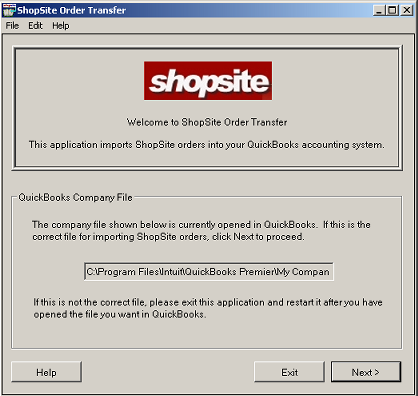
  2. The Welcome screen displays the path to the company file that is currently open in QuickBooks:

    If you want to download orders into this company file, click Next. If this is not the correct company file, click Exit and open the correct company file in QuickBooks before restarting ShopSite Order Transfer.
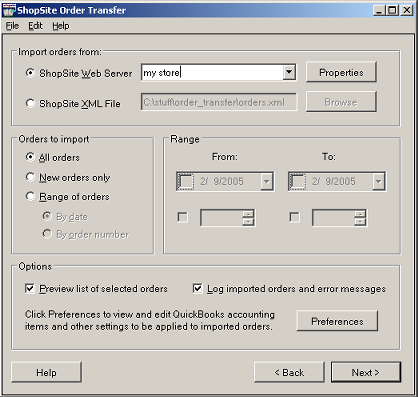
  3. The next screen contains all of the order download options. The Properties button and Preferences button are described elsewhere in the help; all other options are described below.

  4. Select a source to import from, either directly from the ShopSite Web Server or from a ShopSite XML file that you downloaded previously. All other settings on this page apply to either source.
  5. Specify the orders that you want to import:
  6. Check the option box if you wan to view a list of orders before they are downloaded, or leave the box unchecked to simply download the orders. Previewing the list of orders is especially helpful if you are downloading a range of orders to make sure that the correct orders are included in the download.
  7. Check the option box if you want to create a log file containing a list of the orders that are imported and any error messages. You can configure the log file location and contents on the Log File tab of the Preferences dialog box.
  8. Click Next to start the download process.
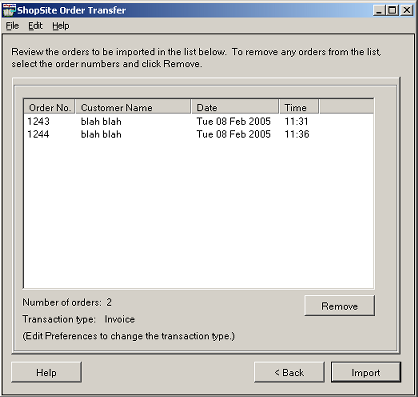
  9. If you chose to preview the list of orders that will be downloaded, you'll see the Review screen:

    You can remove any orders that you do not want to download by selecting the orders in the list and clicking the Remove button. Click Import to import the orders into QuickBooks.


ShopSite Help and Resource Center
Last updated: February 9, 2005
Give Feedback

© 2007, ShopSite, Inc.
ShopSite Shopping Cart Software