ShopSite Order Transfer needs information about the server that hosts your ShopSite store so that it can connect to the server and download orders.
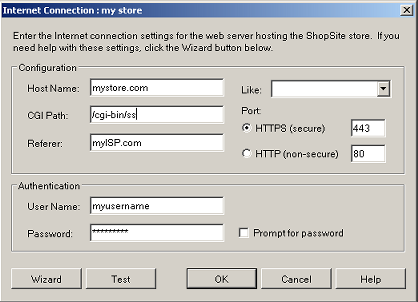
When Order Transfer first opens, you will be prompted to select a source to import orders from. Select ShopSite Web Server, enter a name for the connection, then click on Properties. This will bring up the Internet Connection screen.
If you aren't sure of the values to use, click the button to have the Wizard configure the values for you.
Like |
If you have already configured a similar internet connection, you can select it and the form will be populated with the data from that connection. You can then change just the relevant details. |
Host Name |
The domain name of the server that is hosting your store, which is most likely the domain name of your store, such as www.mystore.com. |
CGI Path |
The path to the directory on the server that contains the CGI programs for the back office. This path is part of the URL that you use when you log in to manage your ShopSite store, such as /cgi-bin/ss. |
Referer |
The domain name of the hosting provider that you use to make an Internet connection from your local PC. For example, if you have cable modem service through ComCast, you would enter comcast.net. |
Port |
If your store is configured to use SSL security, click the HTTPS radio button. Otherwise, click the HTTP radio button. You probably do not need to change the default port numbers unless your hosting provider has given you different port numbers to use. |
User Name |
The name that you use to log in to your ShopSite store, which is most likely your store name. |
Password |
The password that you use to log in to your ShopSite store. Leave this field blank and check the Prompt for password checkbox if you want to be prompted for your password each time you download orders. |
Click the button to go to a screen where you can enter some information from the ShopSite back office and the ShopSite Order Transfer application will help you fill in the required information on the Web Server Connection screen. |
|
Test |
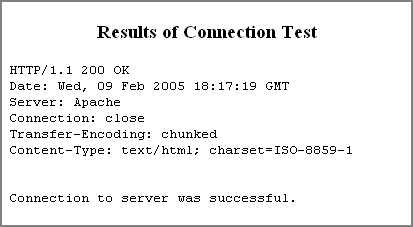
Click the button to test whether a connection to the Web server can be opened successfully using the settings on this screen. A successful test result looks like this:
|
|
ShopSite Help and Resource Center Last updated: February 9, 2005 Give Feedback |
 © 2007, ShopSite, Inc. ShopSite Shopping Cart Software |