Upgrading ShopSite Order Transfer

Upgrading ShopSite Order Transfer to the latest version is simple, and won't delete any of your existing preferences. To upgrade Order Transfer, just follow the steps outlined below.

  1. Download the latest version of Order Transfer.
  2. Make sure you have exited from both Order Transfer and QuickBooks.
  3. Locate the OrderTransferSetup.exe file on your computer and start (double-click) it.
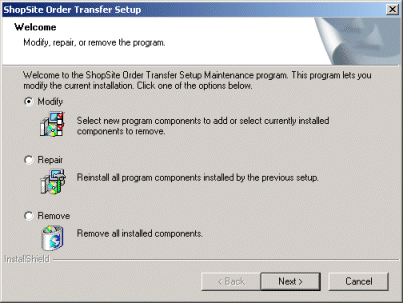
  4. When prompted, select the option to Modify your current installation.

  5. A warning box will appear to make sure you have exited QuickBooks before the upgrade begins. If you are sure QuickBooks is not running, click Yes.
  6. Order Transfer will install the upgraded program files. When the install has completed, click the Finish button.

After the upgrade completes, you can open QuickBooks and start using the upgraded Order Transfer program.


ShopSite Help and Resource Center
Last updated: August 15, 2005
Give Feedback

© 2007, ShopSite, Inc.
ShopSite Shopping Cart Software