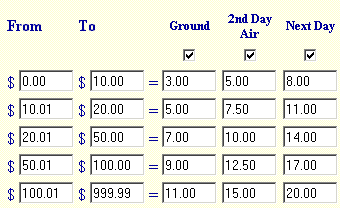
Screen: ShopSite > Commerce Setup > Shipping > Shipping by Currency
The Shipping by Currency table lets you define how much your store will charge for shipping based on the total cost of the order and the delivery method that the customer chooses. By default, three delivery methods are enabled, but you can enable or disable as many as you need. You can change the names of the delivery methods in Preferences > Store Text > Shipping.
To use Shipping by Currency, simply define your rate table on this screenShopSite adds up the total price for all products in an order and charges the shipping amount set here in the table.
When you define your table, it is best to include two decimal places in the price ranges -- such as "0.00 to 9.99" and "10.00 to 19.99" -- to be sure to cover all possibilities. To set a maximum charge, set the "To" value in the last defined range to a cost beyond what customers will spend on a single order, such as 9999.99.
A Shipping by Currency table might look like this:
|
ShopSite Help and Resource Center April 18, 2002 Give Feedback |
 Copyright © ShopSite, Inc. http://www.shopsite.com |