Custom Template Example Page
The page below was produced with the sample page template and sample product template.
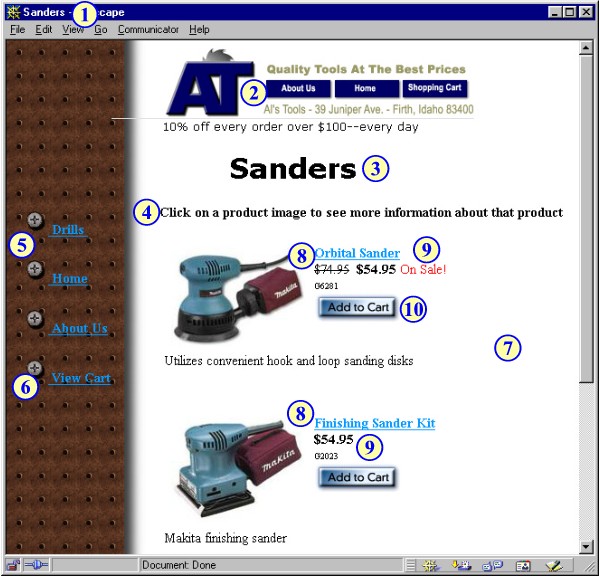
The overall page layout is composed of nested tables. Both the page template and the product template use IF tags to conditionally insert parts of the page.
- The page title comes from the page name field, using the [--PAGE.Name--] tag.
- The page header is a table containing graphics and links. The contents of the header are defined in the Preferences section of ShopSite, not in the template. The page template uses an IF tag to determine if the header is supposed to be displayed on this particular page, and the [--HEADER--] tag to actually insert the header. The footer (not visible in this screen shot) is done the same way.
- The page name comes from the [--PAGE.Name--] tag.
- The introductory sentence is the information in the page's Text 1 field, added to the page with the [--PAGE.Text1--] tag.
- The links on the left are formatted in a nested table, with each link in its own cell. The first three links are assigned to this page in the merchant interface, and are produced with a single loop, using [--LOOP LINKS--], [--LINK--], and [--END_LOOP LINKS--] tags.
- The URL for the View Cart link comes from the [--SHOPPING_CART_URL--] tag.
- The products are in another nested table, with each product in a cell. Like the links, the products were assigned to this page using the regular merchant interface, and the [--LOOP PRODUCTS--], [--PRODUCT--], and [--END_LOOP PRODUCTS--] tags create the HTML for the products when the store is published.
- The layout of each product is defined by the sample product template, which uses a two-cell table to put the product graphic next to some of the product information.
- The product template uses an IF statement to determine if the product is on sale. Depending on the result for each product, different information and formatting are added to the page.
- The Add to Cart button uses the [--PRODUCT.AddToCartButton--] tag to get the graphic and the [--PRODUCT.AddToCartURL--] tag to create the correct URL.
