Create a Cross-Store Product Directory
What is a Cross-Store Product Directory?
ShopSite's cross-store product directory feature allows you to create a categorized listing (taxonomy) of all products in all stores that you host. You can use that information to create enhanced offerings to entice merchants to your services and to entice customers to your merchants.
For example, you can create a directory that allows customers to navigate a hierarchy of products (Toys > Stuffed Animals > Teddy Bears), or a search feature that lets customers locate products that match their criteria. Both methods (and anything else you can think of) provide greater convenience for customers and greater visibility for your merchants.
Some of the benefits of a cross-store product directory are:
- The hosting service can now offer more of a "mall" environment to better attract merchants and customers. Consequently, your service offerings have greater value to merchants.
- Merchants know that their products have greater visibility, because customers don't actually have to enter the merchant's store to find the merchant's products.
- Customers can quickly find and compare products offered by many merchants, thus making shopping quicker and more convenient.
How Does It Work?
ShopSite provides the interfaces and information required to create a cross-store product directory, but the hosting service must create its own tools to gather and sort the information. When those tools are in place, the general flow is as follows:
- When adding a new product to a store, a merchant clicks a button to select a category for that product.
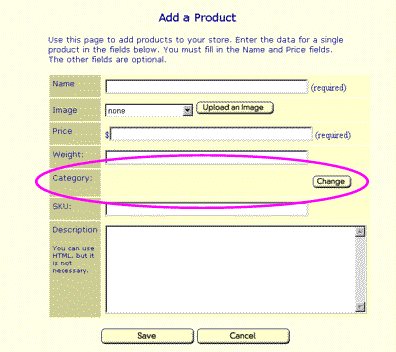
- ShopSite calls the "category chooser" tool (created by the hosting service) and passes it some basic information, such as the storeID and the last product category that was selected by that merchant.
- ShopSite displays the category chooser tool to the merchant within a frame in the regular ShopSite interface. Here is a screenshot of the Lycos category chooser:
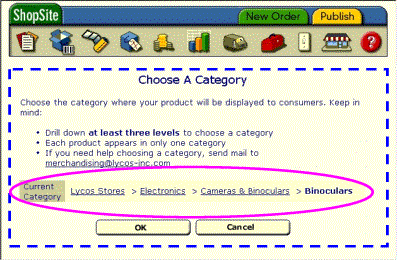
The blue dotted line illustrates the part of the screen that is generated by the Lycos category chooser application. Lycos implemented a chooser--circled in pink--which lets merchants move up and down the product hierarchy by clicking on categories and subcategories.
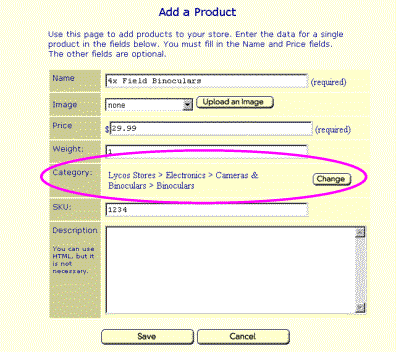
- After the merchant selects a category and clicks OK, the category chooser tool notifies ShopSite of the name and ID of the category chosen. ShopSite displays the Add Product screen again with the chosen category, like this:
- When the merchant finishes adding the product and publishes the store, ShopSite writes an XML file containing information about the products in the store, including product names, prices, descriptions, and categories. ShopSite then notifies an "information harvester" program (created by the hosting service) that the new XML file exists.
- The information harvester application reads the XML file to gather the information about the product.
- The information harvester adds the product information to the mall-wide database of products, from which it becomes available to customers in some fashion. This part is really up to hosting service, depending on what kinds of services they want to offer to customers.
What Do I Have To Do?
If you read the "How Does It Work?" section, above, then it is obvious that creating a cross-store product directory involves a bit of programming by the hosting service. Specifically, it involves these steps:
- Design and create a database for storing product information gathered from all stores.
- Read the specification and create a "category chooser" application. This application must have an HTML interface that merchants can use to select categories and subcategories for their products, and it must pass a little information back to ShopSite.
- Read the specification and create an "information harvester" application. ShopSite will notify this application when products have been added or changed in the store. This application must then read XML files created by ShopSite that contain product information, and add that information to the database from step 1.
- Create an interface to let customers find products in the database. This could include a category tree that they can navigate, or a search function, or anything else.
- Modify the ShopSite global.aa file to let ShopSite know where to find the "category chooser" and "information harvester" applications.
